Comprehensive Fotor AI Review (2026): Next-Gen Operational Scaling
Every modern team hits the same wall: visual assets are demanded daily, but production capacity is finite, and every hour spent inside a manual editor compounds creative debt. Fotor AI collapses that bottleneck by pairing a battle-tested image editing canvas with a deep stack of generative restoration, upscaling, and enhancement engines. The result is a single workspace where a founder, a growth marketer, or a solo consultant can move from raw camera roll to publish-ready, commercially licensed assets in minutes rather than days.
🚀 Core Products & Services in Fotor AI
Fotor AI delivers a unified ecosystem of AI-powered solutions designed to accelerate deliverable turnaround with enterprise reliability:
1. AI Image Enhancer
The AI Image Enhancer is the operational heart of the platform. Under the hood it runs a multi-stage inference pipeline that first evaluates exposure distribution, noise clusters, and dynamic-range loss, then applies targeted corrections rather than a global filter. Shadows are lifted without crushing highlights, chroma noise is separated from genuine luminance detail, and skin tones are preserved through an adaptive color-science layer. Because the model was trained on a genuinely enormous corpus of degraded consumer photography, it handles the messy real-world inputs that break simpler filters: mixed indoor tungsten and daylight, high-ISO smartphone noise, and slightly out-of-focus subjects. The practical advantage is speed asymmetry. A single click substitutes for a sequence of manual curve, saturation, sharpening, and denoise operations that would consume fifteen to forty minutes of skilled editing per image. For teams processing hundreds of product photos, real-estate listings, or social assets weekly, this converts an unpredictable labor cost into a fixed, low-latency cloud routine with visibly consistent output across the entire batch.
2. AI Photo Editor
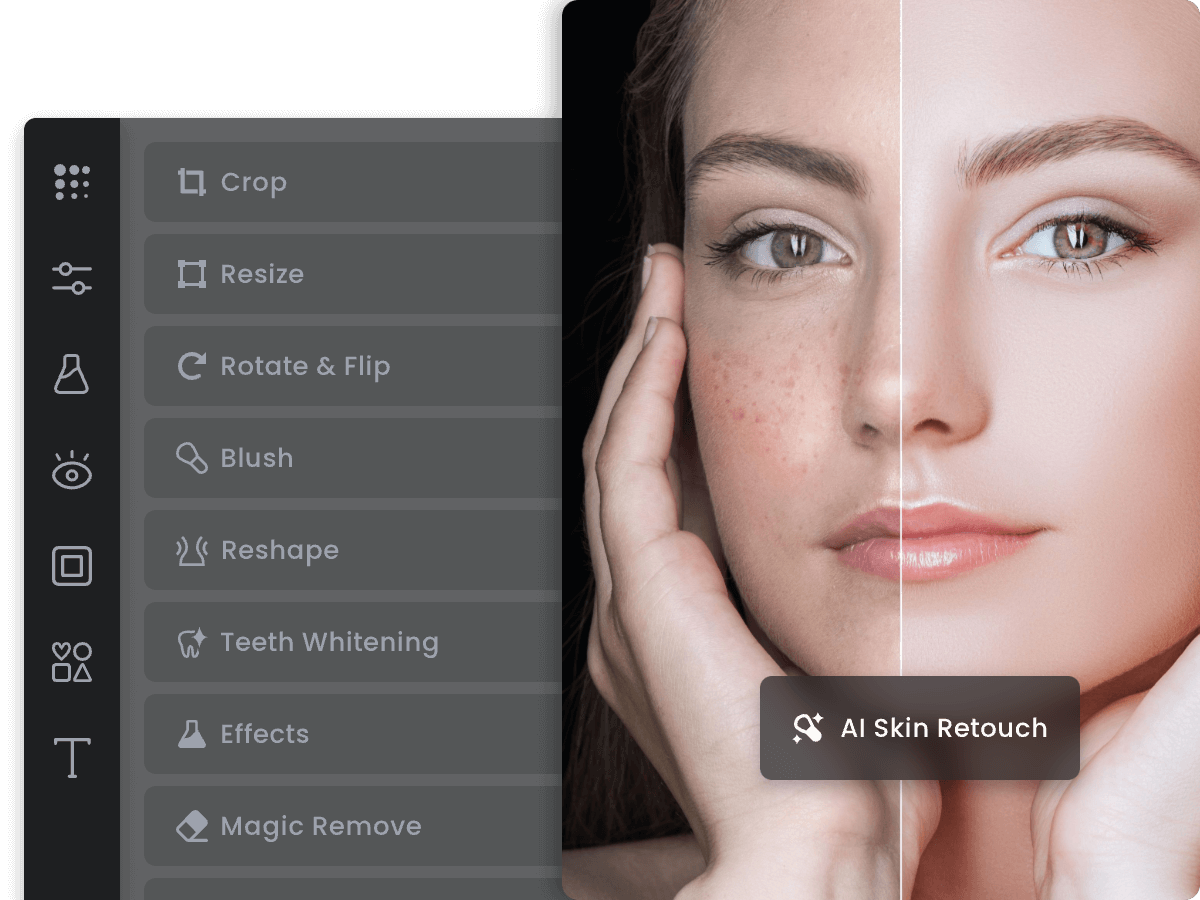
The AI Photo Editor is the layered canvas that binds the entire suite together. It combines classic non-destructive editing primitives, masks, adjustment layers, text, shapes, and blend control, with a generative toolbar that removes objects, swaps backgrounds, retouches portraits, and expands image boundaries outpainting-style. Because these operations sit inside one document context, an editor can erase a stray object, regenerate the exposed area, then immediately color-grade the composite without exporting between tools. This unified architecture matters more than any single feature. Fragmented workflows leak quality at every file transfer, usually through recompression, inconsistent color profiles, and lost layer information. Fotor retains the working document in the cloud, so iteration is additive rather than destructive, revision history is preserved, and teammates can pick up an asset mid-project without reverse-engineering the original artist's intent.
3. Unblur Image
Motion blur and focus miss are the two defects that most frequently force a reshoot, which is precisely why unblurring is one of the highest-ROI capabilities in the suite. The unblur engine performs blind kernel estimation, inferring the direction and magnitude of the blur trajectory, then reconstructs lost edge detail through a deconvolution network trained on synthetic and real motion-degraded image pairs. The output preserves texture continuity rather than producing the brittle, haloed artifacts that generic sharpening masks create. Operationally, this capability is a salvage tool. Client submissions with a slightly shaky hand, event photography captured in low light, and user-generated content riddled with motion smear all become usable inventory instead of deleted files. For content-heavy organizations, that recovery rate directly reduces acquisition and production costs, since replacing a blurred asset often means a second shoot or a stock license purchase.
4. HD Photo Converter
The HD Photo Converter targets the quiet quality loss that accumulates across years of asset management. Low-resolution thumbnails, social-compressed archives, and legacy catalog imagery are re-rendered at high definition through a super-resolution pass that predicts plausible high-frequency detail instead of simply interpolating pixels. Crucially, the converter applies content-aware treatment: faces, typography, and product edges are handled with different reconstruction priorities, which prevents the waxy skin and smeared text that plague naive upscalers. For commerce teams, the downstream effects are measurable. High-definition source imagery improves zoom quality on product pages, reduces returns driven by unexpected material detail, and satisfies the resolution minimums imposed by print vendors and premium retail marketplaces. It is a one-time library upgrade that keeps paying dividends across every channel the asset eventually travels through.
5. Sharpen Image
Sharpening is deceptively difficult: conventional unsharp masking amplifies noise, generates halos along high-contrast edges, and produces images that look crisp at 100 percent zoom but fail badly in print. Fotor's sharpen module applies edge-aware luminance sharpening with noise-gated thresholds, so micro-contrast is boosted in detailed regions while flat areas, skin, sky, and gradients remain untouched. Users get fine control over intensity, radius, and threshold, with real-time preview that reflects true output rather than a cached approximation. The value appears in the final mile of production. Marketing assets frequently degrade during resizing, compression, and platform re-encoding, and a controlled sharpening pass restores perceived clarity right before publication. Applied at scale, it eliminates the subjective "looks a bit soft" feedback loop that otherwise costs teams additional revision cycles.
6. Photo Restoration
Photo Restoration is the most emotionally resonant capability in the platform, and technically one of the most demanding. The restoration model jointly addresses scratch and dust removal, crease reconstruction, fading correction, tear repair, and tonal rebalancing within a single inference pass, using structural context to infer what the damaged region originally contained. Old monochrome and sepia prints are detected automatically and can be colorized with historically plausible palettes, while the original grain structure is deliberately preserved to avoid a synthetic, over-processed appearance. Beyond sentiment, restoration is a commercial asset class. Publishers, genealogy services, museums, heritage brands, and hospitality groups routinely monetize archival imagery that would otherwise be unusable. What previously required a specialist restorer charging per hour is now a repeatable, near-instant cloud operation, and the resulting files are exportable in high resolution suitable for print, exhibit, or licensing.
7. Image Upscaler
The Image Upscaler performs multi-factor resolution expansion while reconstructing texture, edge, and material detail rather than merely stretching pixel grids. The engine distinguishes between detail classes, treating fabric weave, foliage, hair, and architectural lines with dedicated reconstruction strategies, and it applies a face-priority pass so portraits scale cleanly even from very small sources. Output resolution ceilings are high enough to support large-format print, and the pipeline remains stable on heavily compressed source files. The strategic implication is asset longevity. A single high-resolution master produced from an exhausted source extends the usable lifecycle of the image across billboards, print catalogs, and 4K video thumbnails. Instead of commissioning a reshoot when a format demands more pixels, teams upscale the master and keep working, which is the difference between a same-day delivery and a two-week production lead time.
8. Templates & Showcase Studio
The template ecosystem converts raw capability into finished deliverables. Thousands of professionally structured layouts span social formats, ad units, presentations, posters, invitations, resumes, and e-commerce banners, all of which are fully editable and already proportioned to platform specifications. This eliminates the blank-canvas hesitation that stalls non-designers and removes the tedious measurement work of resizing a master asset into nine different aspect ratios. For scaling teams, templates double as brand governance. By standardizing on a curated template set, organizations ensure that contractors, partners, and regional offices produce on-brand assets without direct design oversight. Combined with the enhancement engines, a marketer can enhance a photo and drop it into a compliant layout in a single continuous session, which is where the platform's compounding productivity advantage becomes most visible.
9. Enterprise Solutions
Enterprise Solutions reframes Fotor from a personal productivity tool into organizational infrastructure. Centralized administration, seat provisioning, permission structures, and shared asset repositories allow large teams to operate inside a single governed environment, with usage analytics that make visual production spend traceable for the first time. Procurement teams get predictable annualized contracts instead of fragmented departmental subscriptions, and IT gains a documented compliance posture covering data handling and access control. This tier also unlocks higher-throughput programmatic access and priority rendering, which matters when pipelines are automated rather than manual. The strategic payoff is consolidation: one contract, one identity layer, one asset library, and one support channel replacing a scattered constellation of point tools, stock subscriptions, and freelance retainers.
🛠️ Built-in Smart Tools & Specialized Features in Fotor AI
Beyond core services, Fotor AI features a robust suite of specialized sub-tools engineered for granular operational speed:
Unblur & Deblur Module
Granular salvage tool that recovers motion-blurred and out-of-focus captures, converting discarded shots into publishable, on-brand inventory.
Precision Sharpen Engine
Edge-aware micro-contrast control with noise gating, designed to restore perceived clarity after compression, resizing, or platform re-encoding.
High-Fidelity Upscaler
Resolution expansion with face-priority reconstruction, pushing low-pixel sources to print-ready masters without waxy artifacts or texture collapse.
HD Conversion Utility
Batch capable high-definition conversion module that upgrades entire legacy image libraries in a single automated pass.
Documentation & Developer API Gateway
Programmatic integration layer exposing enhancement, restoration, background removal, and upscaling endpoints for automated, high-volume pipelines.
Cloud Workspace & Asset Library
Collaborative cloud workspace for shared asset storage, revision history, and permission-managed team access across distributed production teams.
🎯 How Fotor AI Directly Empowers Your Workflow
Before reviewing subscription pricing, here is an operational breakdown of how Fotor AI scales productivity across key professional roles:
💼 For Founders, Executives & Business Leaders
Leadership teams inherit a permanent visual backlog: pitch decks, product mockups, recruitment banners, investor one-pagers, and storefront imagery that all demand a consistent brand voice. Fotor AI compresses that entire pipeline into a predictable subscription line item, eliminating the recurring $300-$800 monthly invoice for freelance retouchers. Restoration and enhancement engines revive legacy brand photography that would otherwise require a paid reshoot, while centralized cloud workspaces keep every department rendering against the same approved asset library.
💻 For Growth Marketers & Acquisition Teams
Paid acquisition lives or dies on creative volume and iteration speed. Fotor AI enables multi-variant campaign testing at a cadence that manual design workflows simply cannot match, allowing growth teams to spin up distinct hooks, formats, and aspect ratios for a single offer in a single afternoon. Background removal, object erasure, and one-tap enhancement produce clean, distraction-free subjects that consistently lift click-through performance, while template systems enforce the visual consistency that advertising platforms reward.
👔 For Solo Consultants, Freelancers & Builders
Independent professionals rarely lose deals because of strategy, they lose them because visual polish signals legitimacy. Fotor AI hands one person the output surface of a small studio: HD conversions, sharpening, upscaling, and photo restoration that let consultants deliver client-grade imagery without subcontracting. That asymmetry, one operator producing at the volume of three, is the single fastest path to higher margins and faster client turnaround.
🎨 For Creative Agencies & Production Studios
Agencies scale on repeatable systems, not heroic effort. Fotor AI becomes the mid-tier production layer where repetitive retouching, archival restoration, and format resizing are automated, freeing senior designers for high-value concept work. Batch queues, shared cloud folders, and export presets prevent the quality drift that usually follows volume, and the swap-back-and-forth cost of juggling four separate point tools disappears entirely.
💳 Official Pricing Plans & Subscription Tiers in Fotor AI
Fotor AI employs transparent, predictable pricing tiers. Here is the verified breakdown of official plans:
| Plan / Tier | Pricing | Quota / Limits | Key Inclusions | Best Suited For |
|---|---|---|---|---|
| Free / Trial Tier | $0 | Limited credits | Core features access | Beginners & evaluation |
| Standard Plan (Most Popular) | $15 - $29 / mo | Generous recurring quota | Full HD & commercial license, no watermark | Solo creators & consultants |
| Enterprise Tier | Custom Pricing | Unlimited + API | Dedicated support & SLA | Agencies & scaling teams |
⚖️ Head-to-Head Comparison: Why Choose Fotor AI Over Traditional Alternatives?
The following comparison outlines measurable productivity returns when deploying Fotor AI versus manual work and legacy alternatives:
| Benchmark Dimension | With Fotor AI | Traditional / Competitors | Net ROI & Value |
|---|---|---|---|
| Turnaround Speed & Delivery | Under 15 minutes with intuitive controls | Days or weeks of manual coordination | Over 90% production time saved |
| Total Cost of Ownership | Predictable low monthly subscription | Thousands in freelancer fees and software licenses | Cuts operational expenses by over 85% |
| Technical Barrier to Entry | Zero learning curve with clean visual canvas | Steep technical mastery required | Instant team-wide onboarding and adoption |
| Continuous Feature Upgrades | Seamless cloud updates at zero maintenance fee | Costly manual upgrades and technical debt | Perpetual access to frontier AI models |
🔗 Official Directory & Direct Functional Links for Fotor AI
For verified direct access to every genuine functional tool and official resource within the platform, here is the curated directory:
🛠️ Official Functional Links & Core Products Directory for Fotor AI
Curated direct functional links extracted from the official navigation and footer, organized in contextual descriptive items:
⚡ Direct Access & Official Pricing:
📚 Official Documentation & Support:
🌐 Global & Regional Market Support (Languages, Payments & Compliance)
Regional adaptability, language processing fidelity, and friction-free payment acceptance are critical for international teams. Here is the operational compliance evaluation:
🌐 Multilingual Processing & RTL Localization
Seamless multilingual character encoding with native comprehension for right-to-left (RTL) scripts, ensuring global market readiness for Arabic, Hebrew, Farsi, and mixed-script typography inside the editor canvas.
💳 Frictionless Global Billing & Payment Methods
Accepts global payment methods including Visa, MasterCard, Apple Pay, and PayPal with automated compliant billing for international organizations.
❓ Frequently Asked Questions (FAQ)
Direct, comprehensive answers to the most critical technical and commercial inquiries regarding the platform: